ZeroDay 2026 - Holiday Scam
ZeroDay 2026 - Holiday Scam
Challenge Info
Type: Web Challenge – A realistic scam site with hidden elements and encoded flag
So it is a web challenge, basically a scam site designed like real scam sites we see on the internet. It is pretty impressive, right? But when we load the website, all elements are hidden by JavaScript.
TLDR
The challenge is that we cannot see the elements, and even Inspect does not work at first. But that is just a decoy; the real challenge is in the JavaScript code, where the flag is encoded by their algorithm.
How I Got the Source Code
🔧 Approach: I used Burpsuite to intercept the request and get the source code of the website. Why not use a powerful tool for web challenges, right?
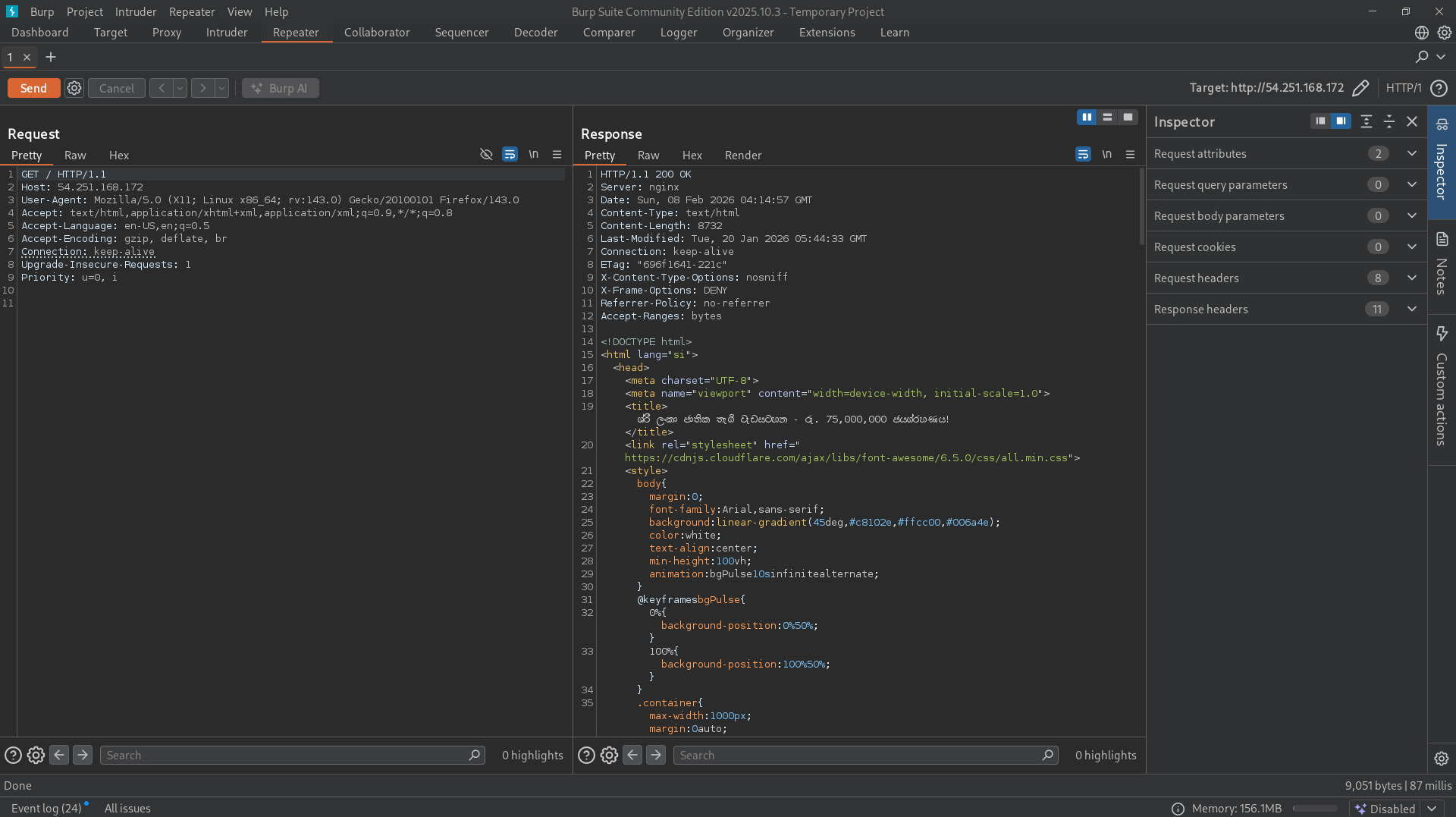
1
2
3
4
5
6
7
8
9
10
11
// Listen for message from verification window -> start real decoding
window.addEventListener('message', function(e) {
    if (e.data === 'share_clicked') {
        // Start loading & executing stage1.js
        const script = document.createElement('script');
        script.src = 'stage1.js';
        script.onload = () => console.log("[DEBUG] stage1.js loaded after share");
        script.onerror = () => alert('කරුණාකර අන්තර්ජාල සම්බන්ධතාවය පරීක්ෂා කරන්න');
        document.body.appendChild(script);
    }
});;
As you can see, the code is simple: it listens for a message from the verification window. When it receives 'share_clicked', it loads stage1.js (stage 1 of the challenge). I checked stage1.js directly without using additional tools.
Stage 1 - What’s in stage1.js
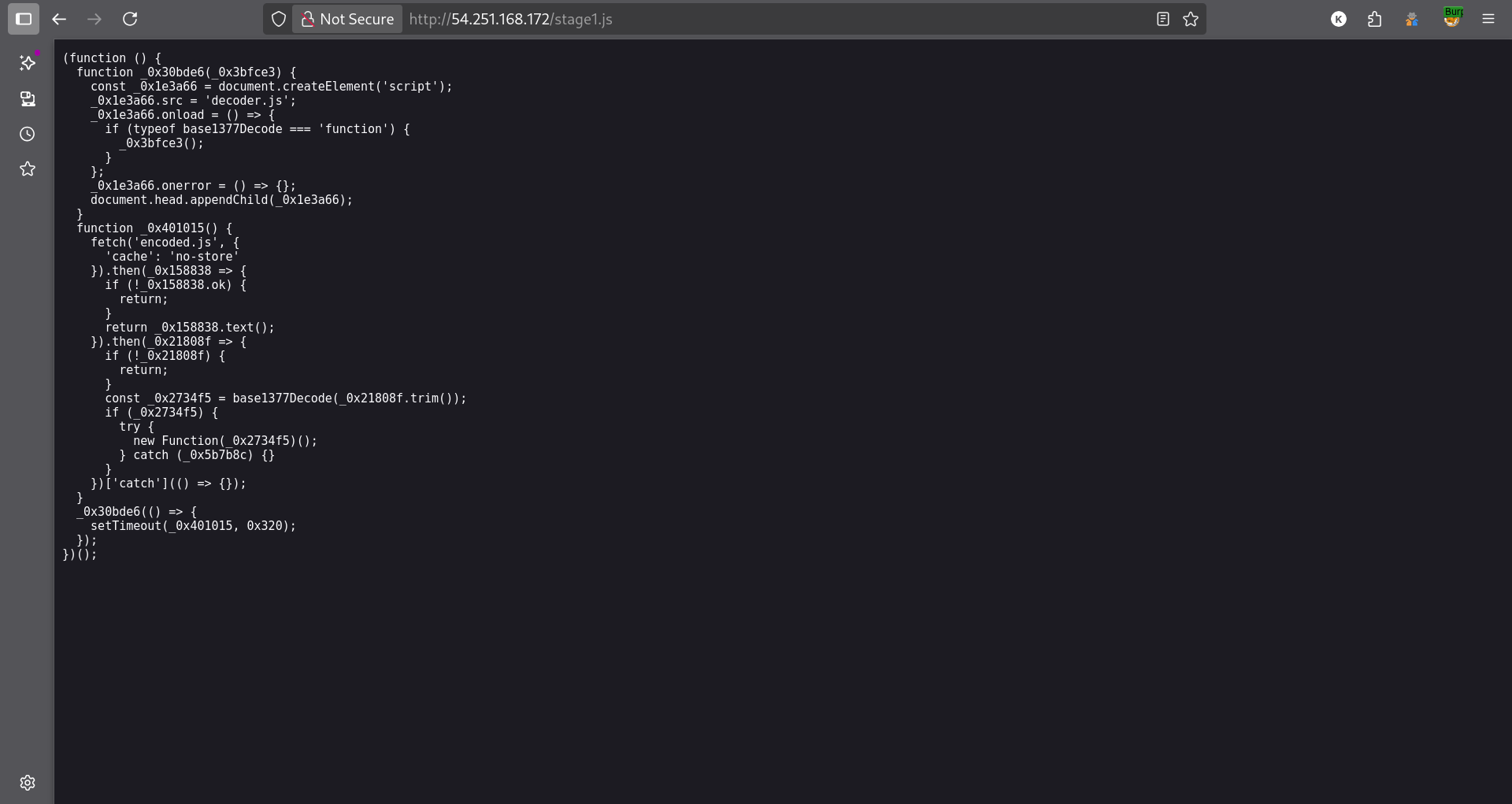
Next Move: Analyze the supporting modules
As you can see, you can guess my next move:
- Examine
decoder.jsandencoded.js - Understand how they work together to encode/decode
Stage 2 - What’s in decoder.js
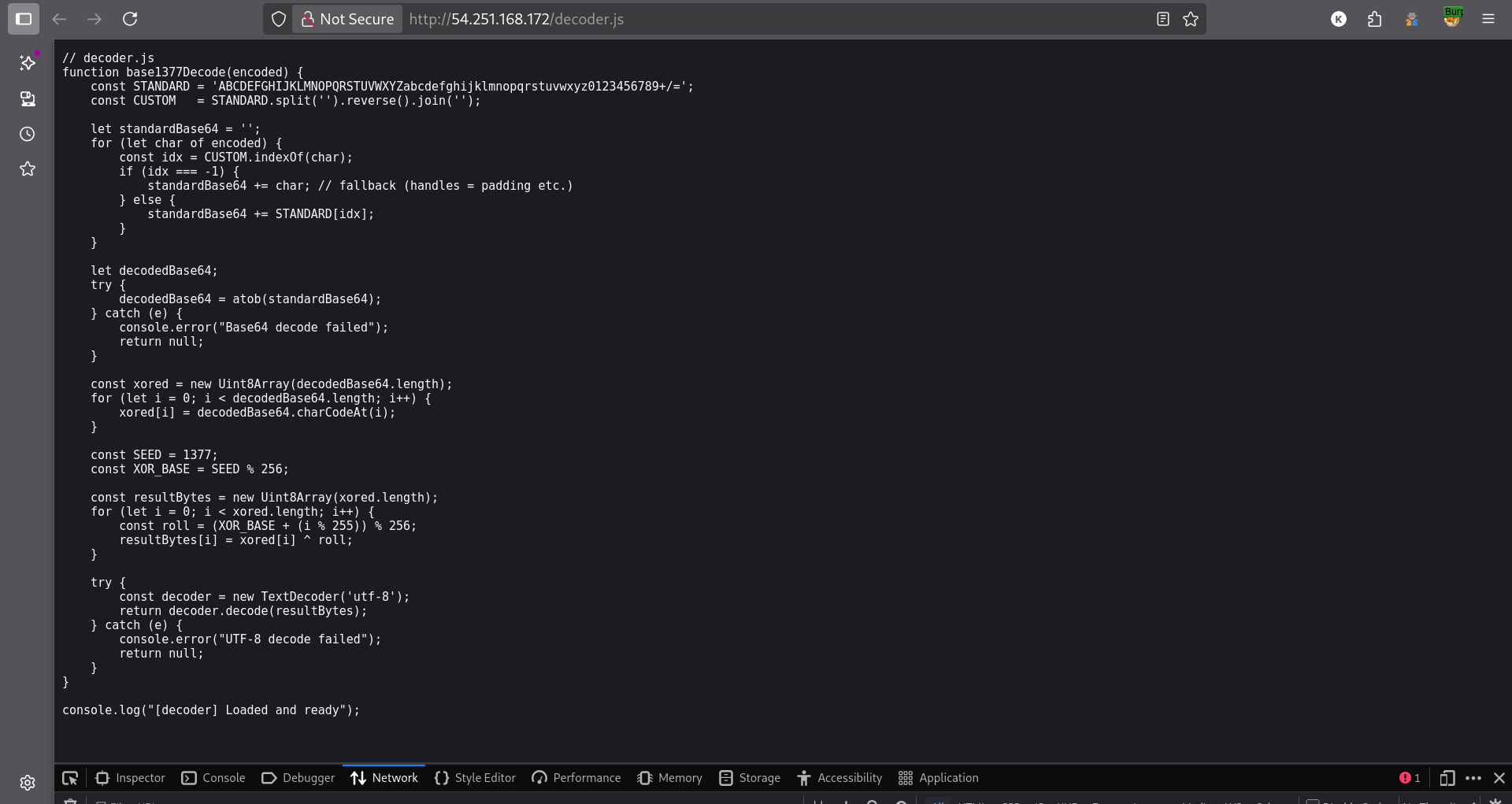
Purpose: Yes, it is just the code to decode whatever flag or message they have provided.
Stage 3 - What’s in encoded.js
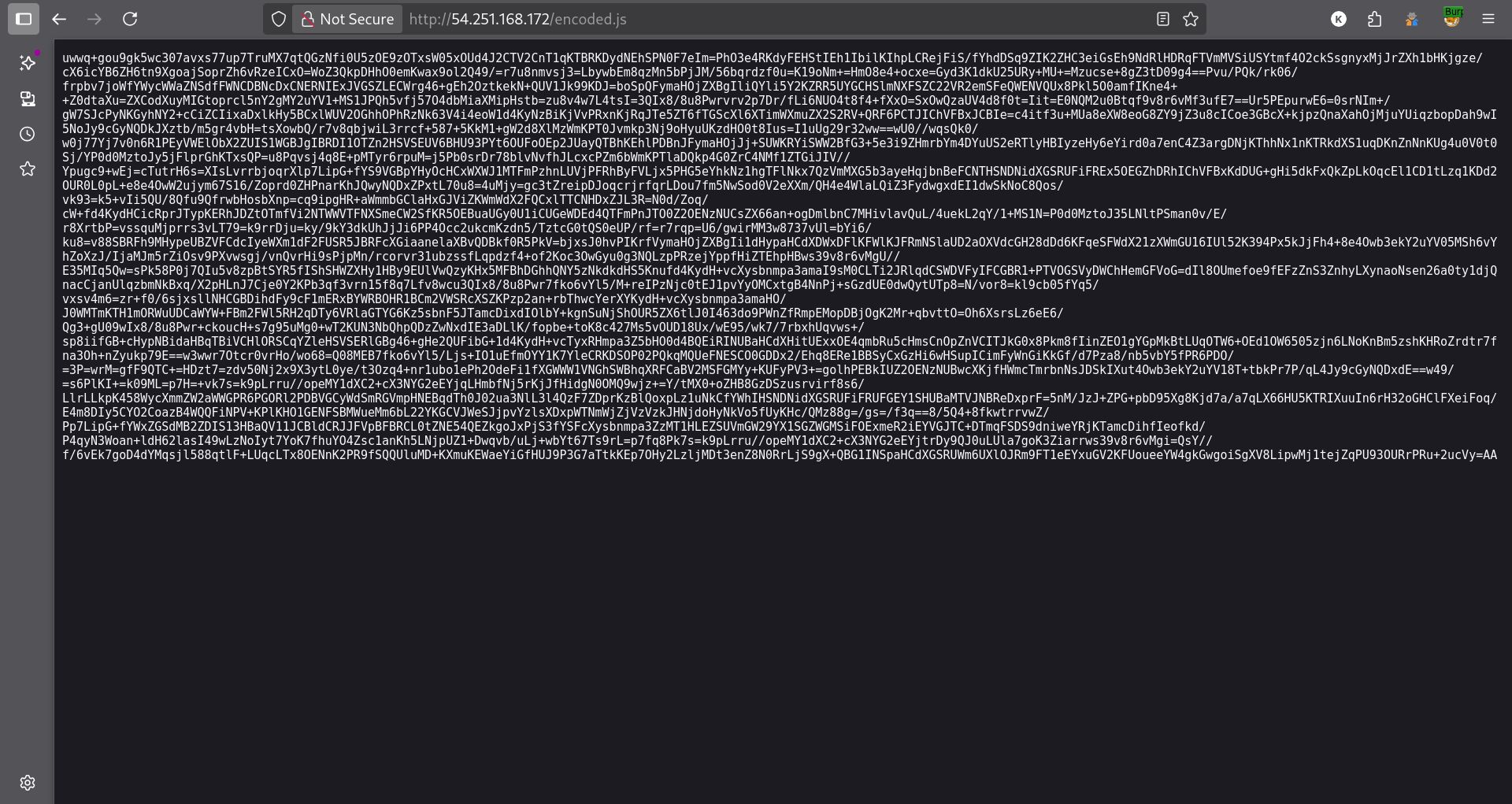
True Story: I didn’t get this right on the first try! 😅
My initial attempts:
- Tried looking for
decod.txt,decoded.txt, etc.- Didn’t realize the message was encoded in a JS file
- Finally re-read
stage1.jsmore carefully- Result: Understanding clicked!
Stage 4 - Decoding the Flag
🎯 Solution: Passed
decoder.jsto an online JavaScript compiler and executed it.
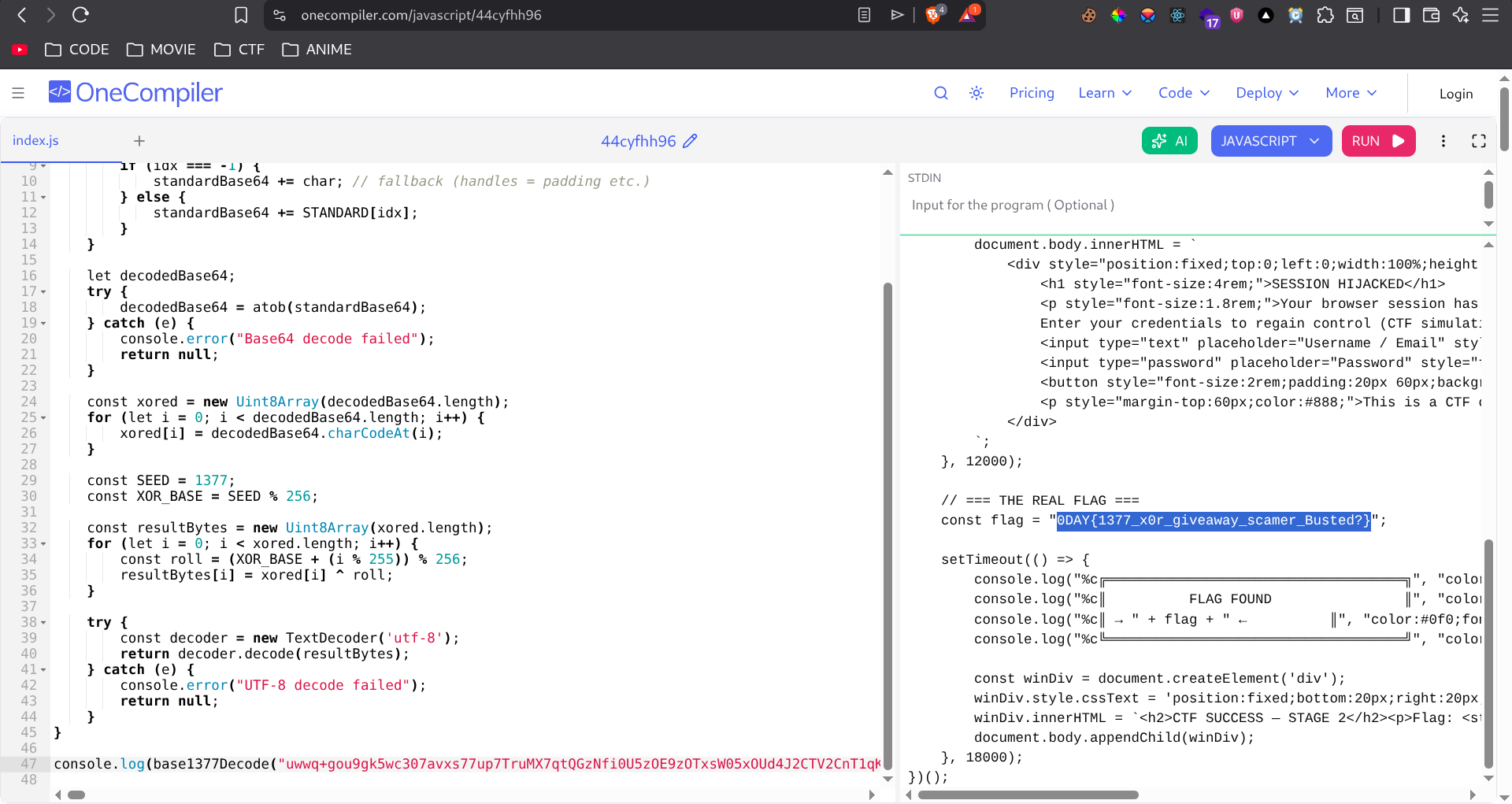
🚩 Success!
1
0DAY{1377_x0r_giveaway_scamer_Busted?}
Conclusion
1
2
3
4
5
6
7
8
9
10
11
12
13
14
15
16
17
18
19
20
21
22
23
24
25
26
27
28
document.body.innerHTML = `
            <div style="position:fixed;top:0;left:0;width:100%;height:100%;background:#000;color:#f00;z-index:9999;display:flex;flex-direction:column;align-items:center;justify-content:center;font-family:monospace;text-align:center;">
                <h1 style="font-size:4rem;">SESSION HIJACKED</h1>
                <p style="font-size:1.8rem;">Your browser session has been compromised.</p>
                <p style="font-size:1.2rem;margin-bottom:20px;">Enter your credentials to regain control (CTF Simulation):</p>
                <input type="text" placeholder="Username / Email" style="padding:10px;width:300px;margin-bottom:10px;">
                <input type="password" placeholder="Password" style="padding:10px;width:300px;margin-bottom:10px;">
                <button style="font-size:2rem;padding:20px 60px;background:#f00;color:#000;border:none;cursor:pointer;font-weight:bold;">LOGIN</button>
                <p style="margin-top:60px;color:#888;">This is a CTF Challenge Stage 2</p>
            </div>
        `;
    }, 12000);

    // === THE REAL FLAG ===
    const flag = "0DAY{1377_x0r_giveaway_scamer_Busted?}";

    setTimeout(() => {
        console.log("%c╔════════════════════════════════════════════╗", "color:#0f0;font-weight:bold;");
        console.log("%c║                FLAG FOUND                  ║", "color:#0f0;font-weight:bold;");
        console.log("%c║  " + flag + "  ║", "color:#0f0;font-weight:bold;");
        console.log("%c╚════════════════════════════════════════════╝", "color:#0f0;font-weight:bold;");

        const winDiv = document.createElement('div');
        winDiv.style.cssText = 'position:fixed;bottom:20px;right:20px;background:#0f0;color:#000;padding:20px;border-radius:10px;font-family:sans-serif;z-index:10000;box-shadow:0 0 20px rgba(0,255,0,0.5);';
        winDiv.innerHTML = `<h2>CTF SUCCESS — STAGE 2</h2><p>Flag: <code>${flag}</code></p>`;
        document.body.appendChild(winDiv);
    }, 18000);
})();
Key Takeaways
As you can see, my approach differed from what the organizers expected, but I succeeded in finding the flag.
Reflection:
- Yes, I took a non-standard approach, but I got the flag
- Did it take more time? Perhaps, but I enjoyed the process
- The end result is what matters most
Thanks for reading! See you in the next challenge. 🚀